The save and the Turbo File#
Everything you make in Super Dante lives in the cartridge's battery memory, and so do the player's three saved games. This page says what the cartridge keeps, how it checks it each time it is switched on, how the three play saves are used, copied and deleted, and how a Turbo File Twin takes copies of the whole lot. It describes what the player sees; the byte layouts are on How it works.
What the cartridge keeps#
The cartridge holds 32 KB of battery-backed memory, and in it one user game and three play saves. There is no second project and no memory-pack slot: the Turbo File Twin is the only place a game can go besides the cartridge.
| What | How much | Notes |
|---|---|---|
| The title and the author | 16 characters each | From Title Settings タイトルのせってい |
| Items | 128 | Each with its name, kind, price, power and who can equip it |
| Magic | 32 | Name, MP cost, power, animation; the effect is fixed by the slot |
| Enemies | 80 | 32 for the field, 32 for the dungeons, 16 for events |
| Heroes | 8 | Name, graphic, starting level, growth, the level each spell is learned at |
| The start | 1 | The first party, gold, the ship and airship, the seven music slots, where the game begins |
| Enemy maps | The field and every screen | Which of the 32 enemies may appear on each field screen and each map screen |
| The field | 1 of 4 | Only the choice: the four fields are drawn in the ROM |
| Maps | 128, from 255 screens | Names, kinds and the screens of each |
| Events | 17,772 bytes in all | The field's and every map's, in one shared space |
| Play saves | 3 | 256 bytes each, with a check figure each |
The sample game FATE is not in that memory. It sits in the ROM, as a complete game of its own, and New Game → Sample Game plays it straight from there. Every editor's Sample Load サンプルロード copies the sample's version of that editor's data from the ROM into your project (Getting started). So the sample can't be lost, whatever happens to the save.
Nothing reaches the cartridge until you save. An editor works on a copy in the console's memory; Save セーブ in its R menu writes it back, and with it the check figures for the whole save (below). Switching off in an editor loses what you did since the last Save.
The power-on check#
Each time the console is switched on and the title menu (Game, Edit, Turbo File ゲーム / エディット / ターボファイル) first appears, the program checks the whole save. It does it once, on that frame, before you can press anything:
- The save must begin with the program's signature, a fixed line of text.
- One check sum over the whole user game must match the figure stored beside it.
- Each play save has a sum of its own.
If the signature or the game's sum is wrong, the program erases the save. It writes a blank project, empties all three play saves, and the title then shows:
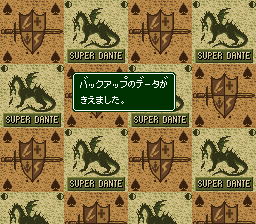
The message is all you get. There is no question first and no way to keep the old data: by the time the message shows, the save is already blank. A blank project is not the sample game: it has no items, maps or events, a party of the first four heroes, and its start on the field. The sample is still there to play, and each editor's Sample Load still brings its part back.
A bad play save is cleared on its own. If only one of the three play saves fails its sum, the program empties that one and leaves the rest of the save alone.
What the check doesn't cover. It runs only at power-on. Returning to the title with L + R + START + SELECT skips it; a game over runs it again on the way back to the title. A load from the Turbo File (below) is not checked either: whatever the file held is copied in, and judged at the next power-on.
The play saves#
Three play saves データ1–3 are shared by every game the cartridge plays: your game, test play from the Edit menu, and the sample. The player writes one with Record きろく in the field's command window (on the field and on foot only) or at an event's save point, choosing a file ファイル1–3. There is no overwrite question: the chosen file is replaced at once (Playing a game).
Continue つづきから in the Game menu lists the three, each with its four party members' names and levels:
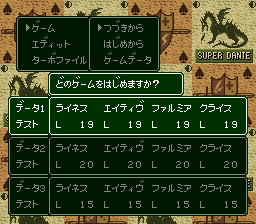
Each save remembers which game it came from, and the list shows it as a tag: テスト for a test play, サンプル for the sample. That decides what it continues:
- A sample save continues the sample, from the ROM, whatever your project now holds.
- A save of your game continues your game as the cartridge now holds it.
- A test-play save continues as test play, even from the Game menu: holding B still stops random battles and walks through walls (Getting started).
A play save keeps the player's progress, not the game. It holds what changes in play; everything else is read from the project when the save is continued:
| In the play save | Read from the project when continued |
|---|---|
| Gold, the party and its order | Heroes' names, graphics and growth |
| Each hero's level, HP, MP and experience | The spells and the levels they are learned at |
| Each hero's ten carried items, and which are equipped | Items', spells' and enemies' figures |
| The 200 switches | Maps, the field and the events |
| Where the party is, and whether it is aboard a vehicle | The music slots |
| Where the ship and the airship are | The title and the author |
| The places visited, for teleport | |
| Which game it is: yours, a test play or the sample |
So editing your game changes the saves made in it. A hero you rename is renamed in every save of your game; a spell's new power applies at once; new music plays. That is handy while testing, and worth remembering before you change a map the party is standing on in a save.
A game over saves nothing. The game goes back to the title, and the player continues from the last Record.
Copying and deleting#
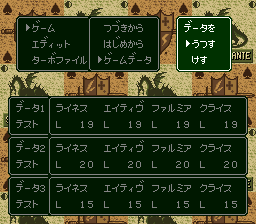
Game Data ゲームデータ in the Game menu offers Copy データを うつす and Delete けす over the three saves. Copy copies a whole play save into another slot; Delete empties one.
The Turbo File Twin#
ASCII's Turbo File Twin is a battery-backed box that plugs into the console's second controller port. Super Dante uses it in its STF mode, the mode its Turbo File library speaks, with the Twin's 124 blocks of 1 KB. It is the only way to keep more than one game, to keep a copy of yours, or to carry a game to another cartridge.
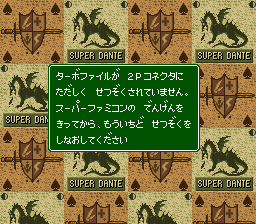
Turbo File on the title menu first checks the device (ターボファイルの チェックを しています). With nothing on port 2 it says the Twin is not connected properly to the 2P connector, and asks you to switch off and connect it again:
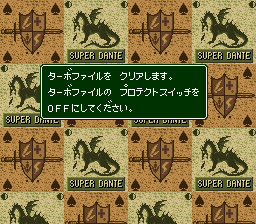
An unformatted Twin is formatted at once. The program says it will clear the Turbo File and asks you to turn the Twin's protect switch off; A at the arrow formats it, with no further question. Anything else on that Twin is gone.
Then the menu, with three entries:
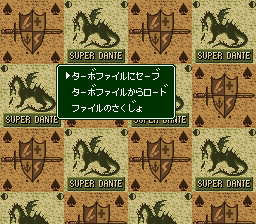
Save#
Save ターボファイルにセーブ copies the cartridge's whole save into a new file on the Twin. The program chooses the file's number itself: one more than the highest already there (000 on an empty Twin). It shows the number and asks for a yes or no; then it writes, and says the save is done.
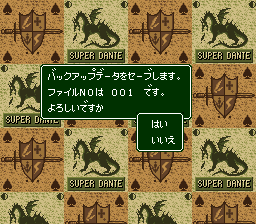
You can't pick a number or save over a file. Each Save makes a new file. To replace an old copy, save the new one, then delete the old.
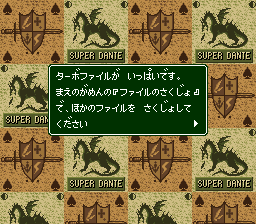
A file takes 32 of the 124 blocks, so a Twin holds three Super Dante games. With fewer than 32 blocks free, the program says so at once and sends you to the delete page:
| On the Twin | Super Dante files that fit |
|---|---|
| Nothing else | 3 (96 of the 124 blocks; 28 left over) |
| One RPG Tsukuru 2 game (62 blocks) | 1 (30 blocks left after it, two short of another) |
| Two RPG Tsukuru 2 games | 0 (they fill the Twin) |
Load#
Load ターボファイルからロード lists Super Dante's files on the Twin, eight to a page, in number order (ファイル 000, 001 …; ページ 1 / 1 at the top). Choose one, confirm, and it is copied onto the cartridge.
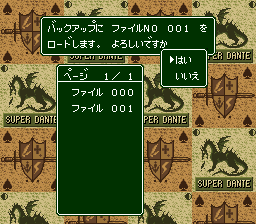
A load replaces everything on the cartridge: the user game and all three play saves. Save your own game to the Twin first if you want to keep it.
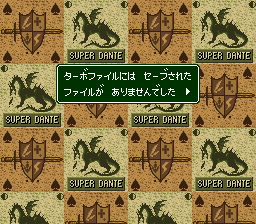
- No files: with none of Super Dante's on the Twin, the page says so and goes back. Other games' files are never listed here.
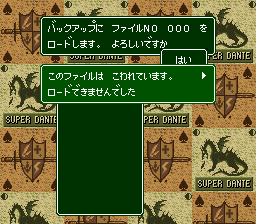
- A damaged file is refused and kept. If a block of the file fails its check, the program says the file is broken and couldn't be loaded. The cartridge is left as it was, because nothing is copied until the whole file has been read; the file stays on the Twin, to be deleted by hand.
A load is not checked. The file is copied in exactly as it was saved, and the power-on check only judges it at the next power-on. A file saved from a sound cartridge is sound, so this only matters for a file made from a save that was already damaged.
Delete#
Delete ファイルのさくじょ is the one page that sees every game on the Twin, not only Super Dante's.
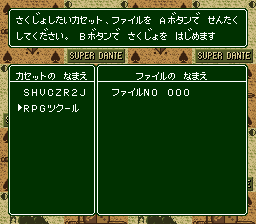 12345
- 1 What to do さくじょしたいカセット、ファイルを Aボタンで せんたくしてください。 Bボタンで さくじょを はじめます A marks, B deletes
- 2 Cartridge names カセットの なまえ Each game on the Twin
- 3 The games SHVCZR2J, RPGツクール Another game by its header; Super Dante's own as RPGツクール
- 4 File names ファイルの なまえ The chosen game's files
- 5 A file ファイルNO 000 Super Dante's files by number
- The left column lists each game on the Twin: Super Dante's own as RPGツクール, any other by the first eight letters of its file header (RPG Tsukuru 2's shows as
SHVCZR2J). - The right column lists the chosen game's files: Super Dante's as ファイルNO and its number, any other by its file's name (RT2's
RPG-TCOOL2-01). - A marks a whole game, all its files; after → into the right column, it marks one file. B asks さくじょします。よろしいですか and deletes what is marked. B with nothing marked offers to go back.
Mark everything and the Twin is formatted instead. When every game on the Twin is marked, the program clears the whole Twin rather than deleting file by file. The result is the same, an empty Twin, but anything else the Twin held goes too.
The debug box#
After a power-on whose check erased the save, every step of the Turbo File pages stops on a one-line box, FUNC:00 ERR:00 ADR:000000 ▶, and waits for a button. It shows the library's function number, its result and an address: a readout the developers used while testing, left switched on by the very flag that a lost save sets. So a player who has just lost a game and reaches for the Twin to restore it meets it every time.
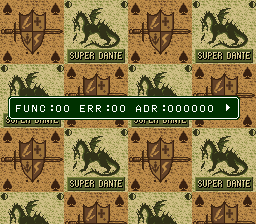
It does no harm. Press a button at each box and the pages work as usual. It stops once a game has been started: play anything (the sample will do), come back to the title with L + R + START + SELECT, and the Turbo File pages are quiet again. More on it in Behind the scenes.
The messages#
| On screen | What it says | When |
|---|---|---|
| ターボファイルの チェックを しています | Checking the Turbo File | On entering, every time |
| ターボファイルが 2Pコネクタに ただしく せつぞくされていません | The Turbo File isn't connected to the 2P connector properly; switch off and connect it again | No Twin on port 2 |
| ターボファイルを クリアします。ターボファイルの プロテクトスイッチを OFFにしてください。 | Clearing the Turbo File. Turn its protect switch off | An unformatted Twin; A formats it |
| ターボファイルにアクセスしています | Accessing the Turbo File | Save, first step |
| バックアップデータをセーブします。ファイルNOは nnn です。よろしいですか | Saving the backup data as file nnn. All right? | Save |
| ターボファイルにセーブしています / セーブが おわりました | Saving / Saved | Save |
| ターボファイルが いっぱいです。まえのがめんの『ファイルのさくじょ』で、ほかのファイルを さくじょしてください | The Turbo File is full. Delete another file with Delete Files on the previous screen | Save, under 32 blocks free |
| ロードしたいファイルを えらんでください | Choose the file to load | Load, over the list |
| バックアップに ファイルNO nnn を ロードします。 よろしいですか | Loading file nnn into the backup. All right? | Load |
| バックアップにロードしています / ロードが おわりました | Loading / Loaded | Load |
| ターボファイルには セーブされた ファイルが ありませんでした | There were no saved files on the Turbo File | Load, none of Super Dante's |
| このファイルは こわれています。ロードできませんでした | This file is broken. It couldn't be loaded | Load, a damaged block |
| さくじょしたいカセット、ファイルを Aボタンで せんたくしてください。 Bボタンで さくじょを はじめます | Choose the cartridges and files to delete with A. B starts deleting | Delete |
| さくじょします。よろしいですか / ファイルを さくじょしています | Deleting. All right? / Deleting the files | Delete, after B |
| まえのがめんに もどりますか | Go back to the previous screen? | Delete, B with nothing marked |
What a Twin file holds#
A file is the cartridge's whole save but its signature: the user game, its check figures and all three play saves, 32,744 bytes after a short header. That fills its 32 blocks exactly. The header names the game (Super Dante's game code and title) and the file's number, so the Twin can tell Super Dante's files from other games'. Saving and loading give back the save byte for byte: a game stored on the Twin and loaded back is the same to the last bit. The layout is on How it works.
Keeping a game safe#
- Save in the editor before you leave it, and before any test play.
- Keep a copy on a Turbo File Twin, and save a new one after a good session; delete the oldest when the Twin is full.
- Mind the battery. A save that the game wrote whole and that later fails the check points to the battery or the contacts. On a second-hand cartridge, dump the save first (above).
- In an emulator, the save file is the cartridge's memory: copy it aside as you would a Twin file. Its first 32 KB are the save.
Fan-made reference material, one of the Eschaton Games Tsukuru guides. Not affiliated with the publishers of the titles it covers. Corrections and questions: contact@eschaton.games.