Getting started#
The opening and the title#
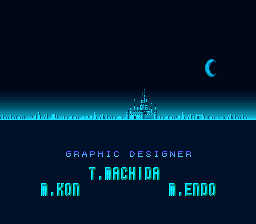
Switched on, Super Dante shows the ASCII logo, then the RPGツクール SUPER DANTE logo over a dark horizon. Then comes the opening demo: a castle on the horizon under a crescent moon, while the staff's names scroll past below it (Behind the scenes has the credits). The demo carries the copyright lines © 1995 ASCII CORPORATION and © 1995 空想科学. Press START to skip to the title menu.

The title menu#
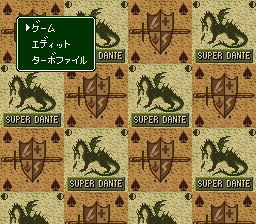
| Entry | Japanese | What it does |
|---|---|---|
| Game | ゲーム | Play: continue a play save, start a new game (yours or the sample), or copy and delete play saves |
| Edit | エディット | The Edit menu: the six editors, the title, delete-all and test play |
| Turbo File | ターボファイル | Save the whole project to a Turbo File Twin in the second controller port, load one back, or delete files (The save and the Turbo File) |
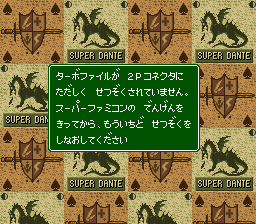
With nothing plugged into the second controller port, Turbo File says so: the Turbo File isn't connected properly; switch the power off and connect it again. The pages it opens with a Twin are on The save and the Turbo File.
The Game menu#
Game ゲーム is where games are played: yours, the sample, and the saves of both.
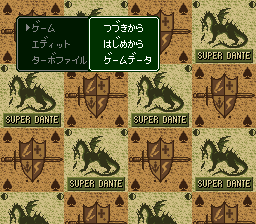
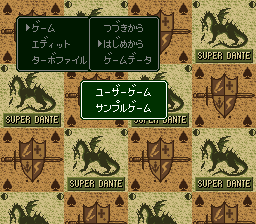
| Entry | Japanese | What it does |
|---|---|---|
| Continue | つづきから | "Which game will you start?" over the three play saves, Data 1–3 データ1–3. Each shows what kind of game it is a save of (Test テスト, Sample サンプル) and up to four party members with their levels |
| New Game | はじめから | User Game ユーザーゲーム: your game, as the editors last saved it. Sample Game サンプルゲーム: FATE, from the ROM. Either opens on a title card |
| Game Data | ゲームデータ | Copy データを うつす a play save to another slot, or Delete けす one |
User Game plays your game as the editors last saved it. Sample Game always plays FATE straight from the ROM, whatever you have done to the copy in the editors (below). Either begins with a title card: the game's title over its field (Playing a game).
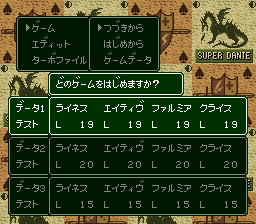
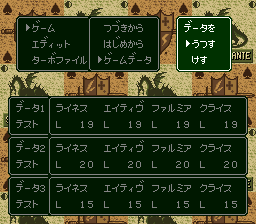
There are three play saves, shared by every kind of play: your game, the sample and test play. Each is tagged with what it is a save of, and a save of the sample plays the sample when continued, whatever is in the editors. A save tagged Test continues as test play even when picked from the Game menu, with test play's one tool (Playing a game). The save and the Turbo File has what a play save keeps and how copying and deleting work.
The Edit menu#
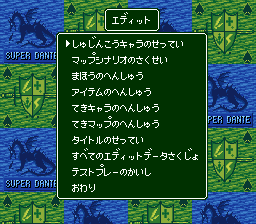
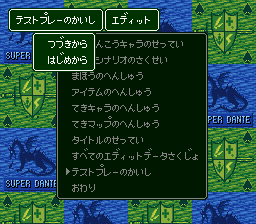
Edit エディット opens a single column of ten entries: six editors, then the title, the whole-game delete, test play and the way out.
 12345678910
- 1 Heroes しゅじんこうキャラのせってい the 8 heroes: name, graphic, magic level, starting level and growth
- 2 Maps and Scenario マップシナリオのさくせい up to 128 maps from a pool of 255 screens; the events are made here too, from its R menu
- 3 Magic まほうのへんしゅう 32 spells, each slot with its own fixed effect
- 4 Items アイテムのへんしゅう 128 items in 14 kinds
- 5 Enemies てきキャラのへんしゅう 80 enemies: 32 for the field, 32 for the maps, 16 for events
- 6 Enemy Maps てきマップのへんしゅう which enemies appear on each screen; the battle test
- 7 Title Settings タイトルのせってい the game's title and your name, 16 characters each
- 8 Delete All すべてのエディットデータさくじょ erases the whole game in the editors, after a warning
- 9 Test Play テストプレーのかいし plays your game; hold B for no battles and walking through walls
- 10 End おわり back to the title menu
| Entry | Japanese | What it holds | Chapter |
|---|---|---|---|
| Heroes | しゅじんこうキャラのせってい | The 8 heroes: name, graphic, magic level (the level each spell is learned at), starting level and the growth of the five stats | The database |
| Maps and Scenario | マップシナリオのさくせい | The 128 maps, drawn screen by screen from a shared pool of 255; the choice of field; and, from its R menu, every event | Maps, Events |
| Magic | まほうのへんしゅう | 32 spells: name, MP cost, power and animation. Each slot's effect is fixed | The database |
| Items | アイテムのへんしゅう | 128 items: name, price, kind, who can equip it, power | The database |
| Enemies | てきキャラのへんしゅう | 80 enemies: 32 for the field, 32 for the maps, 16 for events (the bosses) | The database |
| Enemy Maps | てきマップのへんしゅう | Which enemies appear on each screen of the field and of the maps; the battle test | Maps |
| Title Settings | タイトルのせってい | The game's title and your name | below |
| Delete All | すべてのエディットデータさくじょ | Erases the whole game in the editors | below |
| Test Play | テストプレーのかいし | Plays your game with one test tool | Playing a game |
| End | おわり | Back to the title menu |
Every editor page has a header bar with its name and, at the right, R:メニュー: R opens that editor's menu (below). An editor takes a moment to open, with a black screen in between.
Maps and events share an editor. Maps and Scenario draws the maps, and its R menu's Events イベントさくせい turns the same map into the event editor, where each event shows as a marker. The field is chosen there too, with Change Field フィールドへんこう: one of four ready-made world maps. Maps and the field and Events cover both.
The controls#
The buttons follow the Japanese convention: A confirms and B cancels.
| Button | In the menus and editors | In a game |
|---|---|---|
| A | Confirm | Open the command window; confirm; go on after a message; land the airship |
| B | Cancel, go back a step | Cancel; in test play, hold it for no battles and for walking through walls |
| ↑ ↓ ← → | Move the cursor | Walk, one cell at a time (no diagonals) |
| X | In the map editor, open the part picker; on the keyboard, the next page of characters | Talk to the cell in front, or search if nobody is there; go on after a message |
| R | Open the editor's R menu (the header shows R:メニュー) | — |
| START | Skip the opening demo | On the title card, go on (as does any button) |
| L + R + START + SELECT | — | Back to the title menu; play since the last save is lost |
These are what the study saw or read in the code. Other buttons in the editors (Y, L, SELECT) may have jobs on some pages that it didn't record; on the field in play they do nothing.
Typing names and text#
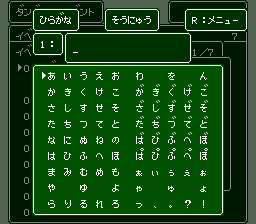
Names, the title and the events' messages are typed on one keyboard page. A tab at the top left names the page of characters; the one beside it shows whether typing inserts そうにゅう or overwrites うわがき. The line being typed is under them, and the header shows R:メニュー, so R has a menu here too. X turns to the next page of characters.
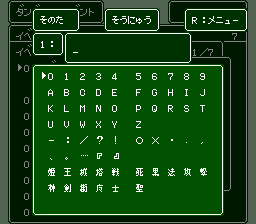
| Page | Japanese | What it has |
|---|---|---|
| Hiragana | ひらがな | あ to ん, the small ぁ ぃ ぅ ぇ ぉ ゃ ゅ ょ っ, and every voiced and half-voiced kana as a key of its own (が, ぱ) |
| Katakana | カタカナ | The same in katakana, with the small ones and the voiced forms |
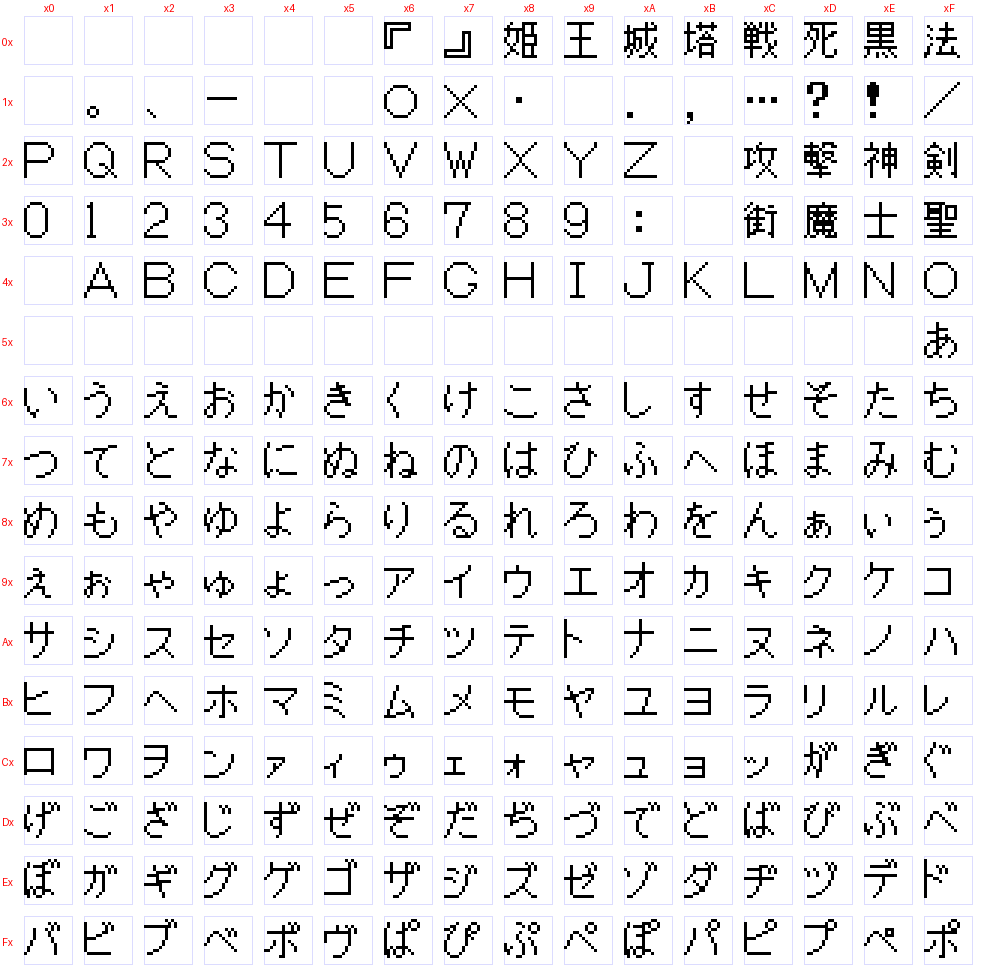
| Other | そのた | The digits 0–9; the capitals A–Z (no small letters); the marks ー : / ? ! ○ × ・ . , 。 、 … 『 』; and 16 kanji: 姫 王 城 塔 戦 死 黒 法 攻 撃 神 剣 街 魔 士 聖 |
What can be typed#
Super Dante keeps text one byte a character, so its set is fixed and small: the two kana, the digits, the capital letters, a handful of marks, a space, and 16 kanji chosen for a fantasy game. A game in English is possible in capitals only. The menus themselves write 力 ("power") as the katakana カ, since there is no kanji 力 to write it with.
The room for each kind of text is fixed:
| Text | Characters | Typed in |
|---|---|---|
| A hero's name | 5 | Heroes |
| An item's, spell's, enemy's or map's name | 8 | Items, Magic, Enemies; Maps and Scenario (Map Name マップの なまえ) |
| The game's title | 16 | Title Settings; shown on the title card |
| Your name | 16 | Title Settings; the ending shows it after SCENARIO |
How long an event's message can be is on the Events page.
The R menu#
Each editor works on a copy of its part of the game. What you change stays in that copy until you save it with R → Save, which asks yes or no and then writes it to the cartridge. Save before you leave an editor, and before a test run: test play reads the game from the cartridge, not from the editors.
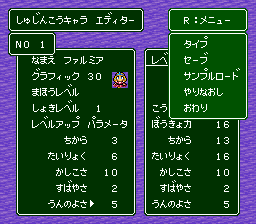
Every editor's R menu ends with the same four entries:
| Entry | Japanese | What it does |
|---|---|---|
| Save | セーブ | Writes this editor's data to the cartridge, after a yes / no. Until then your changes live only in the editor |
| Sample Load | サンプルロード | Loads the sample game's version of this editor's data (its heroes, say, or its items) over yours |
| Undo | やりなおし | "Do over": by its name, throws away your changes in this editor. The study didn't test how far back it goes |
| End | おわり | Leaves the editor for the Edit menu |
Most editors add their own entries before these:
| Editor | Its R menu adds, before the four |
|---|---|
| Heroes | Type タイプ: fills in the hero's five growth values from one of six presets, hero えいゆう, warrior せんし, mage まほうつかい, priest そうりょ, sage けんじゃ or thief とうぞく. The type itself isn't kept |
| Maps and Scenario | Whole Map ぜんたいマップ, Events イベントさくせい, Move Map マップいどう, Copy コピー, Map Name マップの なまえ, Map Type マップの しゅるい |
| Events | Whole Map, Change Field フィールドへんこう, Dungeon ダンジョン, Copy, Delete さくじょ, Delete all すべて さくじょ |
| Items | Copy コピー, Delete さくじょ |
| Enemy Maps | Whole Map, Dungeon, Copy, Delete, Battle Test せんとうテスト |
| Magic, Enemies, Title Settings | Nothing: the four alone |
Each save adds one to a counter in the save, and rewrites the one checksum that covers the whole game. That checksum is what the power-on check tests (below).
Title Settings#
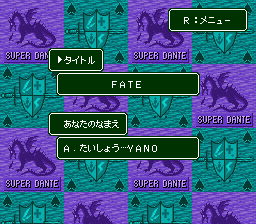
Title Settings タイトルのせってい holds two lines of up to 16 characters: the title タイトル and your name あなたのなまえ. The title appears on the title card at the start of every new game. Your name appears in the ending, on the card after SCENARIO, among the program's own staff (Playing a game). FATE's title is centred with spaces (FATE), and its name line reads A.たいしょう…YANO.
Delete All#
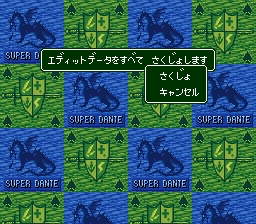
Delete All すべてのエディットデータさくじょ erases the whole game in the editors at once. It asks first: "All the edit data will be deleted", with Delete さくじょ or Cancel キャンセル. The study saw the question but didn't carry it out, so what exactly is left afterwards isn't settled here. Each editor's Sample Load brings its part of FATE back. To empty one part only, use that editor's own Delete instead.
Test Play#
Test Play テストプレーのかいし offers Continue つづきから or New Game はじめから, then plays your game as the cartridge holds it. It has one test tool: hold B and no battles start, and the party walks through walls. Nothing else changes. Playing a game has the details.
The sample game#
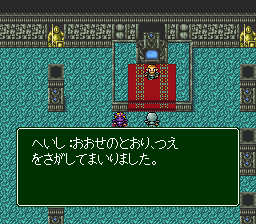
The ROM holds a complete sample game: FATE, a fantasy built on Norse myth. ライネス (Raines) sets out with a holy sword, guided by the world tree, through castles and towns named from the myths (アスガル, ミズガル, ヴァルハラ), to face the demon lord デュー and a man in black who wants the sword. It is a straight adventure with no lessons about the program in it. The sample game FATE tells it all, with its maps.
The sample is on the cartridge twice over:
- New Game → Sample Game plays it straight from the ROM. Nothing you edit changes it, and it can't be erased. Its play saves are tagged Sample.
- In the editors it is ordinary data, to study or to build on. A cartridge with its factory save has it loaded. Each editor's R → Sample Load brings back that editor's part.
Play it before you start your own. Then open it in the editors to see how its shops, inns, doors and story are built (Events).
One game per cartridge#
The cartridge holds one game of your own: the one in the editors. User Game plays it, and starting another means erasing it. To keep several, move them off the cartridge.
Turbo File ターボファイル does that with ASCII's Turbo File Twin, plugged into the second controller port. Each save takes 32 of the Twin's blocks, so it holds three of Super Dante's: the whole project, the play saves included. The game numbers the files itself (000, 001 …). Loading replaces the game on the cartridge, so save yours to the Twin first if you want to keep it. The save and the Turbo File has the pages and their messages.
Keeping your game safe#
The cartridge keeps the whole project in 32 KB of battery-backed memory, with one checksum over the whole game and one for each play save. Every time the cartridge is switched on, Super Dante checks it as the title menu appears. If the game's checksum is wrong, it erases the whole project at once and says バックアップのデータがきえました ("the backup data has been erased"). The editors come up empty, not with the sample game, and the play saves are gone. A play save that fails its own checksum is cleared alone.
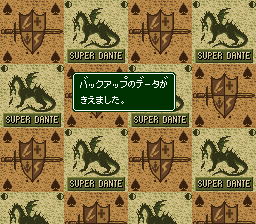
Normal use never sets it off, because every save rewrites the checksum. What does:
- switching off or resetting while the game is writing a save, in an editor or in play;
- a failing battery or dirty contacts, which let a byte of the save change or be read wrong. The second-hand cartridge this study used had six stray bits in its save, enough to fail.
So:
- Don't touch the power while a save is being written.
- Copy the save of a second-hand cartridge before its first power-on, with a cartridge reader. If the copy fails Super Dante's check, clean the contacts and read it again; trust a copy once two reads agree. A save that fails on every read may still be mended: Behind the scenes tells how this study's was.
- Keep a backup: a Turbo File Twin on hardware, or a copy of the save file in an emulator.
Back to the title#
Hold L + R + START + SELECT together during play to go back to the title menu. It works in every game, test or not; nothing is saved, and the power-on check isn't run again. The console's own RESET restarts the program; by the code, it then goes straight to the opening demo, skipping the logos.
An order of work#
The editors depend on each other. A hero learns spells from the Magic list and equips items from the Items list. An event's battle needs enemies, and a warp needs a map to go to. Enemy maps need both maps and enemies. A workable order:
- Play FATE, then look at it in each editor.
- Choose a start: build on the sample, or erase it with Delete All and take back only the parts you want with Sample Load.
- Title Settings: the title and your name.
- Magic and Items: the spells (remember that each slot's effect is fixed) and the weapons, armour, potions and keys.
- Heroes: names, graphics, the levels they learn each spell at, starting levels and growth. Type fills in the growth for you.
- Maps and Scenario: choose the field, then draw the castles, towns and dungeons. Each map is up to 4 × 4 screens, from a pool of 255 shared by all of them. Set each map's type before its events.
- Enemies, then Enemy Maps: who appears on which screen. The battle test there tries a fight at once.
- Events: the warps that join the field to the maps first, then the people, shops, inns, treasure and the story, held together by switches.
- The start of a new game: the party, its place, the gold, the ship's and airship's places and the music slots (The database).
- Test Play after each step. Save every editor first.
Fan-made reference material, one of the Eschaton Games Tsukuru guides. Not affiliated with the publishers of the titles it covers. Corrections and questions: contact@eschaton.games.